¶ MD-1000D
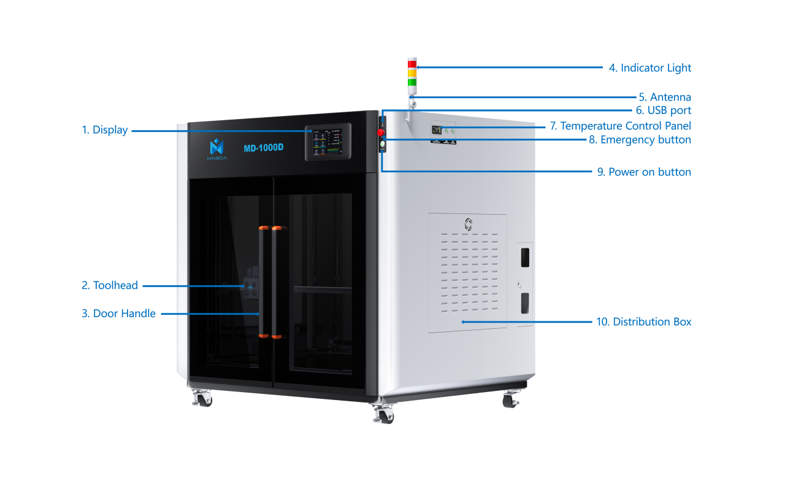
This page provides information about the MD1000D printers, including Quick Start, Print Settings, Troubleshooting, Maintenance, Firmware Upgrading, and more.
¶ Quick Start
The Quick Start section includes links that quickly show how to set up the MD1000D 3D printer and other general information related to it.
- Quick Start Guide
- Unboxing Guide for MD1000D
- MD1000D Introduction
- MD1000D First Print
- MD1000D FAQ
- MD1000D Package list
Wi-Fi/LAN cable connection guide for MD1000D
¶ Printer Features
In the Printer Features section, you can find detailed guides related to various features available on the D series printers.
MD1000D Screen Operation Guide
Printer Calibration Guide
Update Firmware
MD1000D Status Indicator Light Meanings
Introduction to the Time-lapse Function of MD1000D Printer
Introduction to MD1000D Filament used off Detection
Introduction to MD1000D Power off Detection
¶ Printing Guides
Load filament
Print from USB
Print from MINGDA Orca Slicer
MD1000D 3D Printing Filament Multi-Material Printing Guide
¶ Troubleshooting
Hotend Unclogging Procedure
First-Layer Printing Optimization Guide
Homing & Leveling Failure Troubleshooting
Nozzle temperature cannot heat up
¶ Maintenance Guides
Belt Tensioning Procedure
XY Axis Lubrication and Maintenance Guide
How to Lubricate Lead Screws and Linear Rods
Hotend Clumping/Blob Cleaning Instructions for 1000D
¶ Part Replacement Guides
In the Part Replacement Guides section, you can find step-by-step guides that show the process of removing and installing various hardware parts of the D Series.
¶ Printer Body
¶ Toolhead
Replace Nozzle
Replace Hotend
Replace Cooling fan
Replace Leveling Sensor
Replace Filament Detector Sensor
Replace Feeding Gear Assembly
Replace Print Head
¶ X/Y/Z-axis/Motor/Belt
Replace X/Y Idler Pully
Replace Y-axis Belt
¶ Circuit Board/Cable
Replace Extruder Board
Replace Leveling Sensor
Replace Motherboard
Replace PI Board
¶ Others
¶ Further Reading
¶ MD-600D
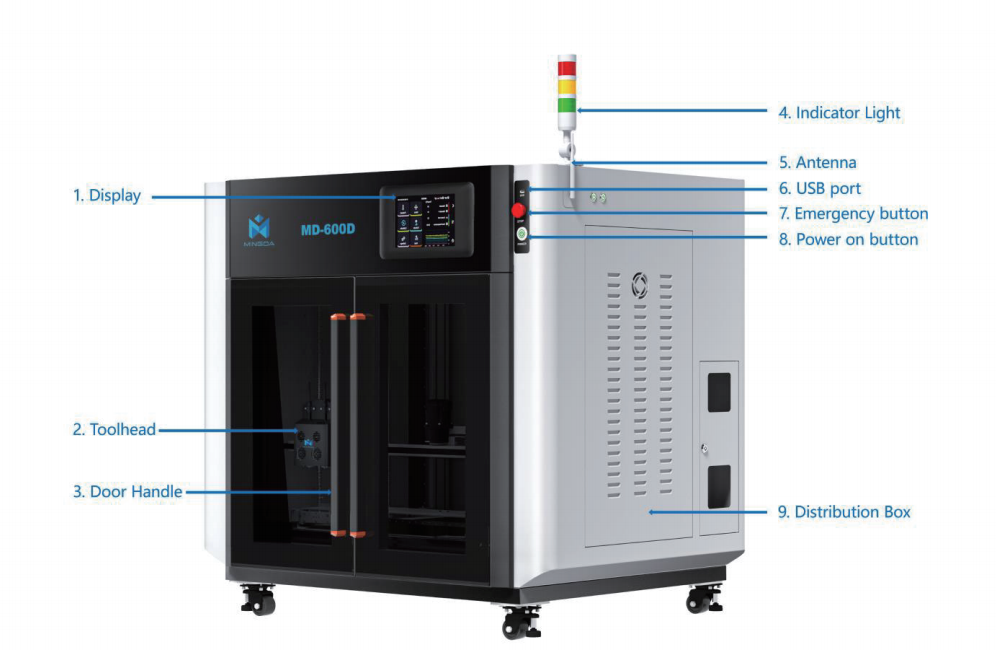
This page provides information about the D Series printers, including Quick Start, Print Settings, Troubleshooting, Maintenance, Firmware Upgrading, and more.
¶ Quick Start
The Quick Start section includes links that quickly show how to set up the MD400D/MD600D/MD1000D 3D printer and other general information related to it.
Quick Start Guide
MD-600D First Print
MD 600D FAQ
MD 600D Packing List
¶ Introduction to the MD-400D/MD-600D/MD-1000D
Introduction to MD400D
Introduction to MD600D/MD1000D
Quick Start Guide
¶ Printer Setup
Connect F01 to MD400D
Connect F01 to MD600D/MD1000D
Wi-Fi/LAN cable connection guide for MD400D/600D/1000D 3D printers
¶ Printer Features
In the Printer Features section, you can find detailed guides related to various features available on the D series printers.
¶ Printing Guides
Load filament
Print from USB
Print from MINGDA Orca Slicer
MD1000D 3D Printing Filament Two Materials Printing Guide
¶ Troubleshooting
Hotend Unclogging Procedure
First-Layer Printing Optimization Guide
Homing & Leveling Failure Troubleshooting
Nozzle temperature cannot heat up
¶ Maintenance Guides
Belt Tensioning Procedure
XY Axis Lubrication and Maintenance Guide
How to Lubricate Lead Screws and Linear Rods
¶ Part Replacement Guides
In the Part Replacement Guides section, you can find step-by-step guides that show the process of removing and installing various hardware parts of the D Series.
¶ Printer Body
¶ Toolhead
Replace Nozzle
Replace Hotend
Replace Cooling fan
Replace Leveling Sensor
Replace Filament Detector Sensor
Replace Feeding Gear Assembly
Replace Print Head
¶ X/Y/Z-axis/Motor/Belt
Replace X/Y Idler Pully
Replace Y-axis Belt
¶ Circuit Board/Cable
Replace Extruder Board
Replace Leveling Sensor
Replace Motherboard
Replace Pi Board
¶ Others
¶ Further Reading
¶ MD-400D
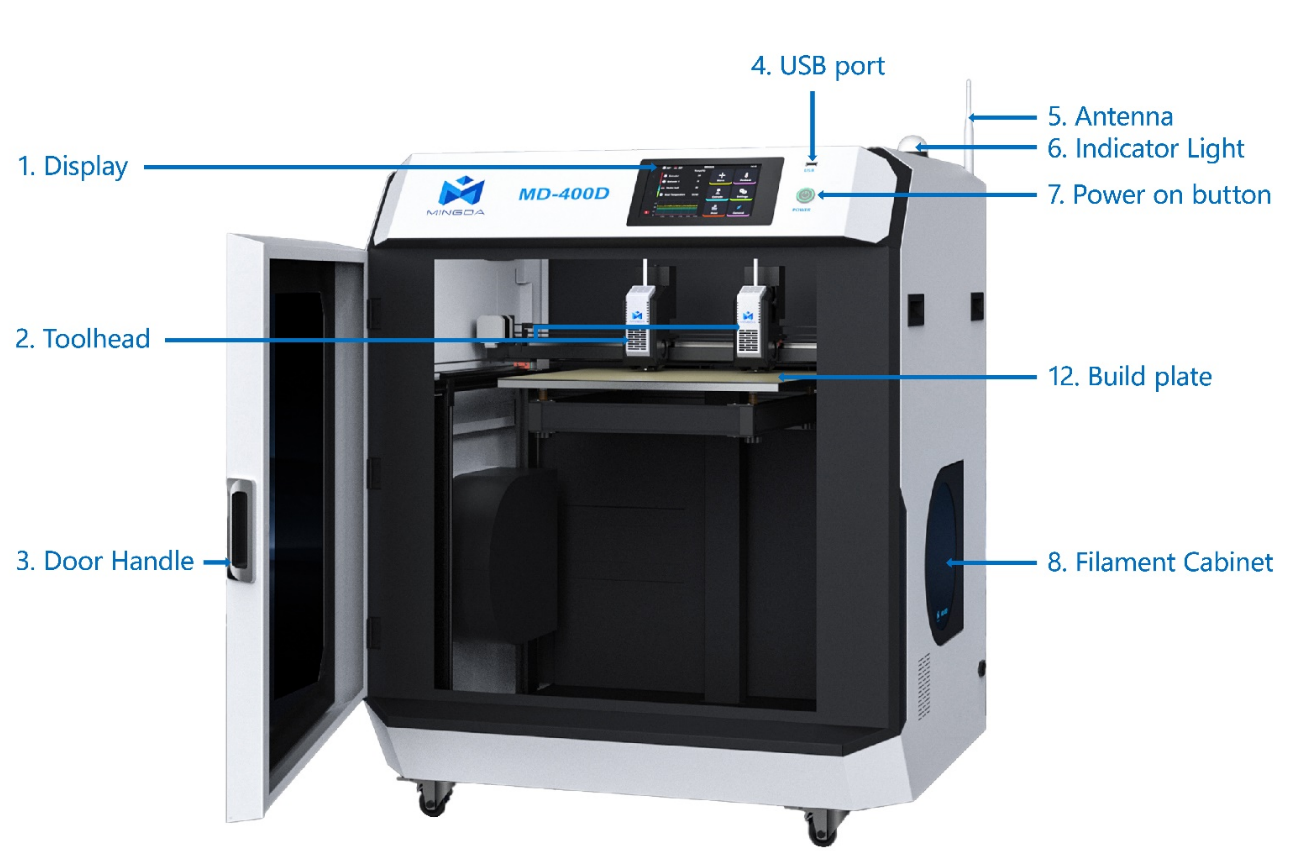
This page provides information about the MD400D printer, including Quick Start, Print Settings, Troubleshooting, Maintenance, Firmware Upgrading, and more.
¶ Quick Start
¶ The Quick Start section includes links that quickly show how to set up the MD400D 3D printer and other general information related to it.
- Quick Start Guide
- Unboxing Guide for MD 400D
- MD400D Introduction
- MD400D First Print
- MD400D FAQ
- MD400D Package list
Wi-Fi/LAN cable connection guide for MD400D
¶ Printer Features
In the Printer Features section, you can find detailed guides related to various features available on the D series printers.
MD-400D Screen Operation Guide
MD-400D Calibration Guide
Update Firmware
MD400D Status Indicator Light Meanings
Introduction to the Time-lapse Function of MD400D Printer
Introduction to MD400D Filament used off Detection
Introduction to MD400D Power Off Detection
¶ Printing Guides
Load filament
Print from USB
Print from MINGDA Orca Slicer
MD400D 3D Printing Filament Multi-Material Printing Guide
¶ Troubleshooting
Hotend Unclogging Procedure
First-Layer Printing Optimization Guide
Homing & Leveling Failure Troubleshooting
Nozzle temperature cannot heat up
¶ Maintenance Guides
Belt Tensioning Procedure
XY Axis Lubrication and Maintenance Guide
How to Lubricate Lead Screws and Linear Rods
¶ Part Replacement Guides
In the Part Replacement Guides section, you can find step-by-step guides that show the process of removing and installing various hardware parts of the D Series.
¶ Printer Body
¶ Toolhead
Replace Nozzle
Replace Hotend
Replace Cooling fan
Replace Leveling Sensor
Replace Filament Detector Sensor
Replace Feeding Gear Assembly
Replace Print Head
¶ X/Y/Z-axis/Motor/Belt
Replace X/Y Idler Pully
Replace Y-axis Belt
¶ Circuit Board/Cable
Replace Extruder Board
Replace Leveling Sensor
Replace Motherboard
Replace PI Board